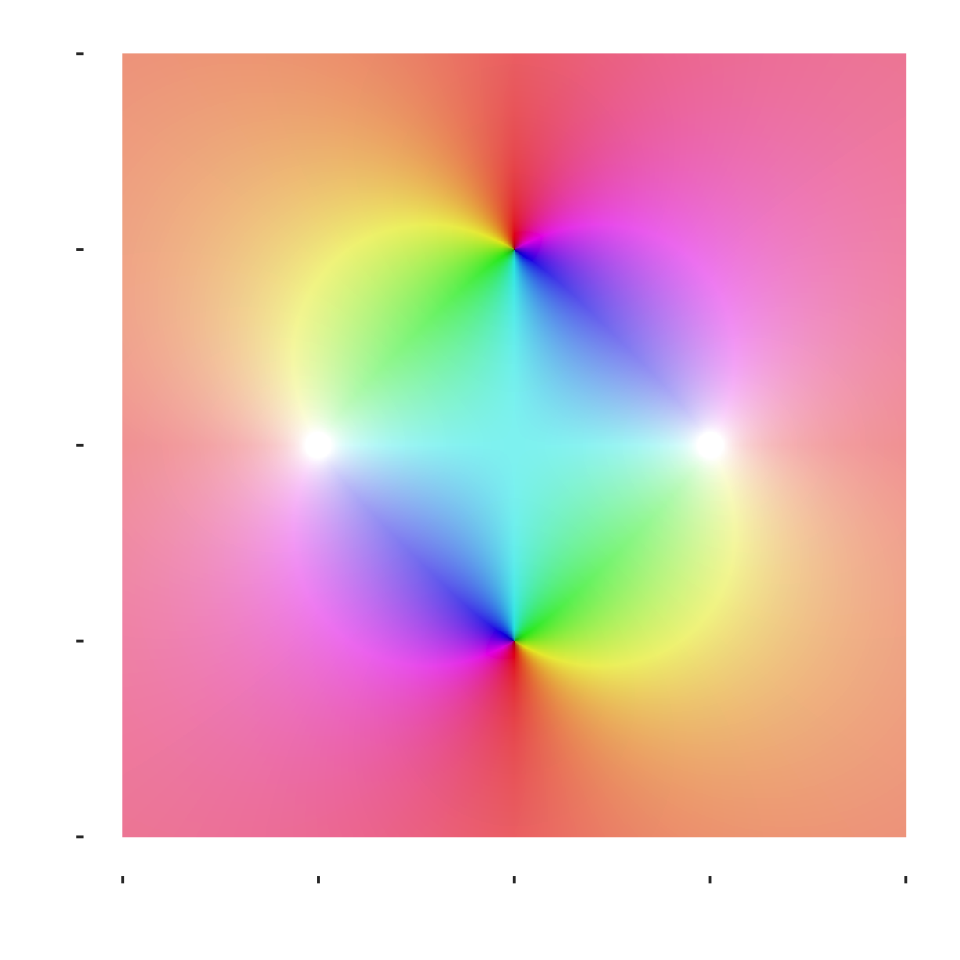
In the meantime, enjoy this cool 4D graphic I made a few years ago for a class I was in…
Visualizing Complex Functions with Domain Coloring
One of the challenges of working with complex-valued functions is that they’re difficult to visualize. For a real-valued function \(f: \mathbb{R} \to \mathbb{R}\), we can easily plot it on a 2D graph. But for a complex function \(f: \mathbb{C} \to \mathbb{C}\), both the input and output are two-dimensional, requiring four dimensions total to represent fully.
Domain coloring provides an elegant solution: we plot the domain (the \(xy\)-plane representing \(\mathbb{C} \cong \mathbb{R}^2\)) and use color to encode information about the output \(f(z)\). Specifically:
Hue represents the argument (angle) of \(f(z)\): \(\text{Arg}(f(z)) \in (-\pi, \pi]\)
Lightness represents the modulus (magnitude) of \(f(z)\): \(|f(z)|\)
Below, I’ve visualized the function:
\[f(z) = \frac{z^2 + 1}{z^2 - 1}\]
This function has two roots at \(z = \pm i\) (where the numerator equals zero) and two poles at \(z = \pm 1\) (where the denominator equals zero). In the visualization, you can identify these special points by observing where colors converge or diverge dramatically.
Code
# functionsmodulus <-function(z) Re(sqrt(z *Conj(z)))f <-function(z) (z^2+1)/(z^2-1)rad2deg <-function(rad, rotate =0) ((rad + rotate) *360/(2*pi)) %%360# definitions# boundariesL <--2U <-2# making meshdomain <-seq(L, U, length.out =1001)mesh <-expand.grid(domain, domain) |>mutate("x"= Var1, "y"= Var2) |>select(x, y)# color mapping componentsz <-complex(real = mesh$x, imaginary = mesh$y)fz <- z |>f()mod_fz <- fz |>modulus()# I ended using the second one from the Wikipedia page # and I added a constant to shift the color, as well as# a scale of 100 (a = 0.4 too)a <-0.4ell1 <- (2/pi)*atan(mod_fz) +65ell2 <- (mod_fz^a/(mod_fz^a +1))/10+65ell3 <-100*mod_fz^a/(mod_fz^a +1) +25# used this one # used saturation of 80my_colors <-Arg(fz) |>rad2deg() |>cbind(80, ell3) |> farver::encode_colour(from ="hsl")df <-cbind(mesh, my_colors) |>as.data.frame()# plot replica attemptdf |>ggplot(aes(x, y)) +geom_raster(aes(fill = my_colors)) +labs(x ="Re(z)", y ="Im(z)") +scale_fill_identity() +coord_equal(xlim =c(-2,2), ylim =c(-2,2)) +theme(panel.background =element_rect(fill ="transparent", color =NA),plot.background =element_rect(fill ="transparent", color =NA),panel.grid =element_blank(),axis.text =element_text(color ="white"),axis.title =element_text(color ="white") )